How I built a software factory I could run by myself
Sometimes the smallest change gets the most planning. For an ordinary feature, I’ll ask an agent to create a design workitem and tell it what I want the feature to do. It drafts the spec. We go back and forth in chat until it describes what I mean, and then I schedule the work. For a small change I can’t afford to get wrong, I want to see the coding agent’s plan before it touches the code, right down to what it’s going to check as it builds.
I built Festival so I can make that call for each job. When a spec needs those extra checks, I ask the agent to create a festival from it. I review the steps with the agent and decide when the work is ready to run. If a check fails halfway through, the agent has something specific to fix before the next piece depends on it. That’s how I can leave a whole feature with one agent while I work on something else. Festival on GitHub · fest.build
What the agent gets along with the spec
I keep the spec in a workspace I call a camp. It’s a Git repository with room for my designs, research, plans and scripts. Under projects/ the agent can find the repositories I’ve added or linked to the workspace. From the camp, an agent can open the design workitem and inspect the code it refers to. When I ask for a change in chat, the agent updates the spec there. Another agent can pick it up later. How Camp organizes projects
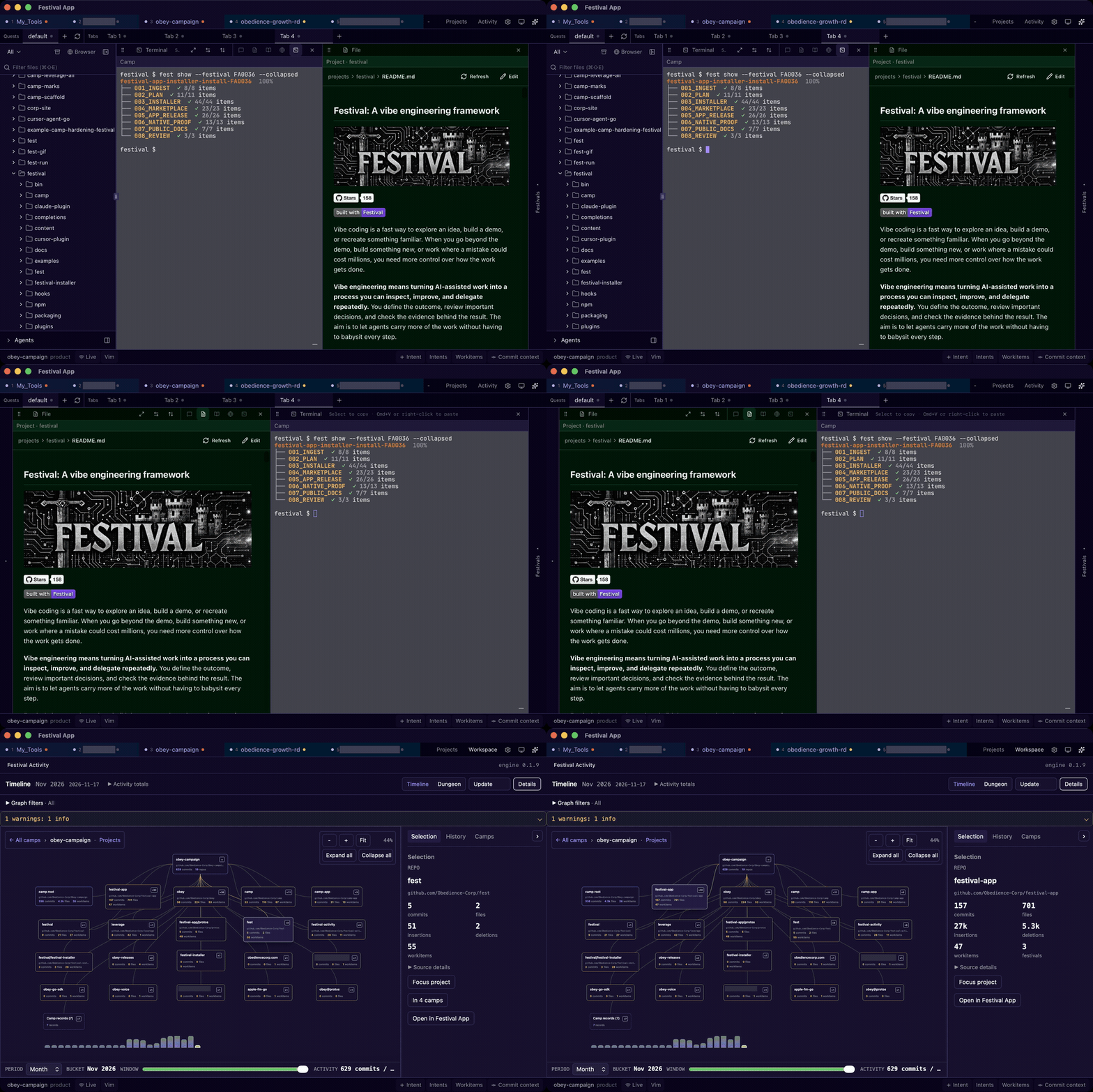
Festival App gives you a look inside a camp. The walkthrough opens a plan beside a README, then brings up camp activity. I can use the same workspace from a terminal.
Why I give an agent a whole job
In March 2025 I wanted to build an idea factory. I’d bring the ideas and direction, and agents would carry the work through. My first implementation, Guild, was a Go program. I gave it a request called a commission. A manager refined it, a planner broke it down and workers took assignments. By early May I was using its planning system for my own projects. By June I could inspect the assignments on a shared SQLite board from my terminal. guild-core source · Commission processing
The question that changed my mind was how long it took to get a finished feature. One agent was already so much faster than doing the job myself before AI that there was little to gain from dividing it further. With several agents I also had to merge the pieces and check that they worked together. Sometimes the split saved a little time. Often it took longer. The parallel work that paid off was giving one agent a whole feature while another took on an independent, long-running job.
I rebuilt around what I’d kept using in Guild, the plan and the shared workspace. In September 2025 Festival was a folder of Markdown templates you could copy. By December, fest next could tell an agent what to do next. In January I built Camp to keep plans, repositories and the material behind them together. In March 2026 I released Camp and Fest together so other developers could use them with their own agents. Original starter kit · Festival release
A camp does what I originally wanted a guild to do. It gives people and agents a place to work on something over time. The agent specializes when it reads the context for its assignment. Its session can be short enough that it hardly needs a name. Its work gets an ID, so I can trace what it produced back to the assignment that shaped it.
How much planning does this job need?
When I ask an agent to plan something, I name the kind of workitem I want it to create in the camp. Which one I pick depends on the size of the job, what I still need to learn and the consequences of getting it wrong.
- For a tiny change, I’ll ask the agent to create an intent workitem. A short note capturing what we agreed on can be enough.
- For most small or average-sized features, I’ll use a design workitem. The agent turns our conversation into a structured spec and revises it as we work out the details.
- If I have a question to investigate, I’ll ask for an explore workitem. That gives the investigation a place of its own, and I can schedule it before deciding what to build.
- For work that needs stages and explicit checks along the way, I’ll use a festival. Sometimes I choose one for a small but critical change because I want those extra review gates.
Once we’ve planned the work, I decide which items to schedule and have agents pick them up. A design workitem can have a workflow of its own. An intent workitem might already say everything the agent needs. I change how I use these as the work changes. Work items and festivals
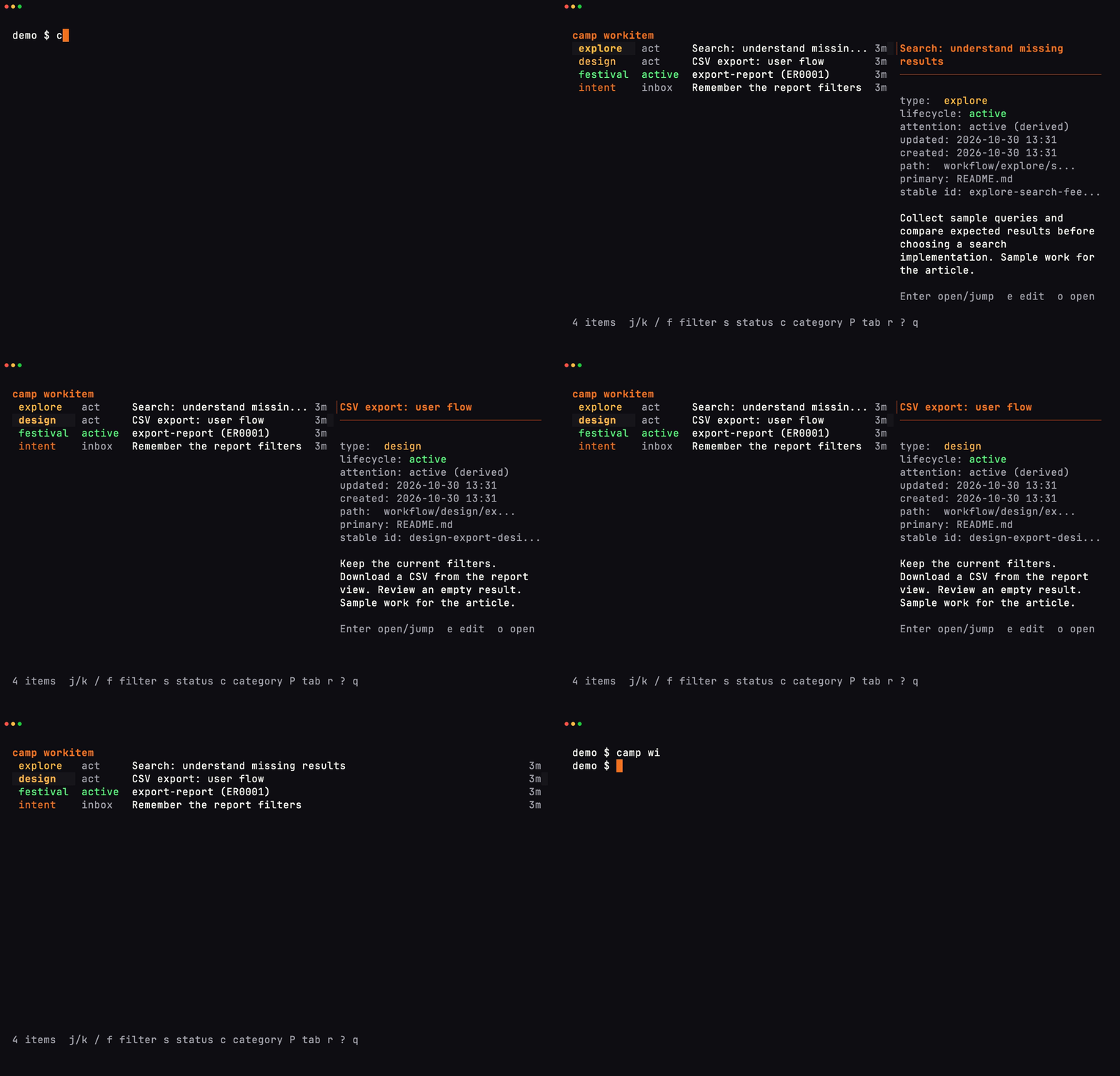
In this sample camp you can open a workitem and read what the agent has been asked to do.
When I promote a design workitem to a festival
Once we agree on the spec, I can ask the agent to build from it. If the order of the work matters or I need a check at a particular point, I’ll ask it to create a festival from the design workitem. We use the planning loop to work out where those checks belong. The agent writes the steps into the plan as we settle them.
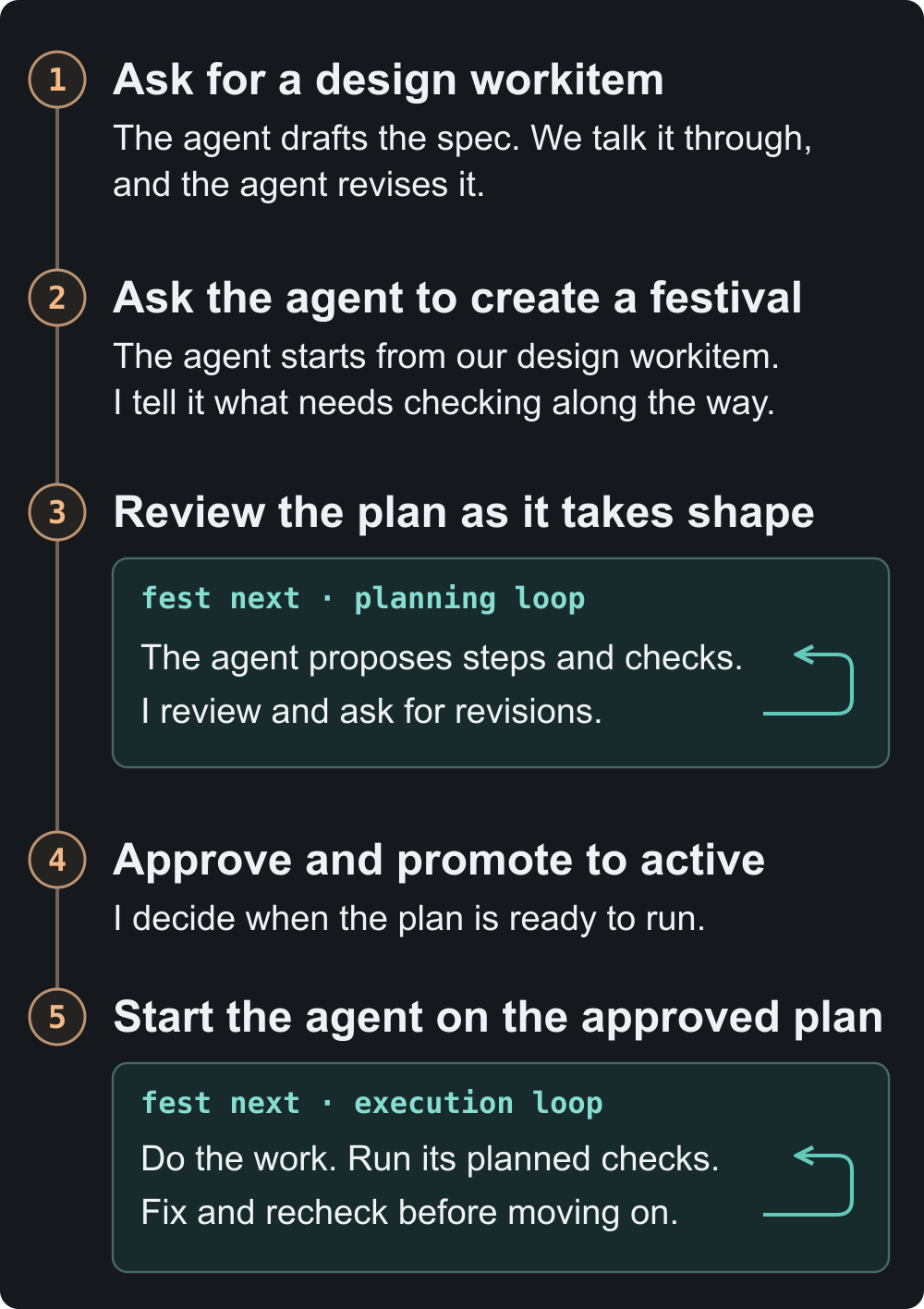
During the planning loop, I can catch a mistake in the proposed approach before anyone writes code. During the execution loop, the agent can catch a mistake in the code while it’s still working on that part. For a CSV export, for example, I can ask it to compare a downloaded file with the filtered rows on screen as soon as filtering is implemented. If the rows differ, the agent has a concrete problem to fix and a check it can rerun before building on that change.
From tickets to pull requests
On a team that used Jira, I wrote a script to pull my tickets into Markdown files under workflow/jira/week/ in my camp. I could keep that script and my planning files in my own repository. My team still got pull requests where they already reviewed code. My notes on using Festival with Jira
For that workflow, I ask an agent to create a festival for the sprint and copy the tickets into its input folder. Then I ask it to run the fest next loop. During the first phase, called ingest, it reads the tickets to work out what the job requires. During planning, it proposes how to group the work and which pieces depend on others. I review the approach, give it context it’s missing and ask for changes. Once I approve the plan, the agent writes out the step-by-step instructions.
Suppose two tickets touch the same code. Putting the changes together might make sense to the agent, but my team needs to be able to review and accept each ticket separately. That’s why I usually ask the agent to include a pull-request gate in the festival plan. It puts a team decision directly into the plan the agent will follow. I tell the agent how the team wants its PRs organized. How I set up the sprint and its PR gates
When I’m happy with the plan, I give the agent the go-ahead to promote the festival to active and set up the Git worktrees, separate working copies where the code changes will happen. Then I start a fresh session in a linked worktree and ask it to run the loop. The link tells Fest which plan goes with that checkout.
Each time the agent runs fest next, it gets the next step that’s ready, along with its instructions and the goals that apply. The agent does the work, records its progress and asks again. If the next step is a review, it reviews the change. If it needs a decision from me, it can mark the task blocked. I can open fest watch to see where it stopped. In the Jira workflow, the agent can keep going until it has opened the pull requests the team expects. The execution loop
What’s left when the agent finishes?
One feature I built this way lets me find the commits for a work item across repositories. Here’s a frame from the saved plan for that feature. The task for implementing the lookup command is checked off. So is the integration-test task. Testing, review, iteration and commit are still open. Even if you’ve never seen the agent’s chat, you can tell where the work stood.
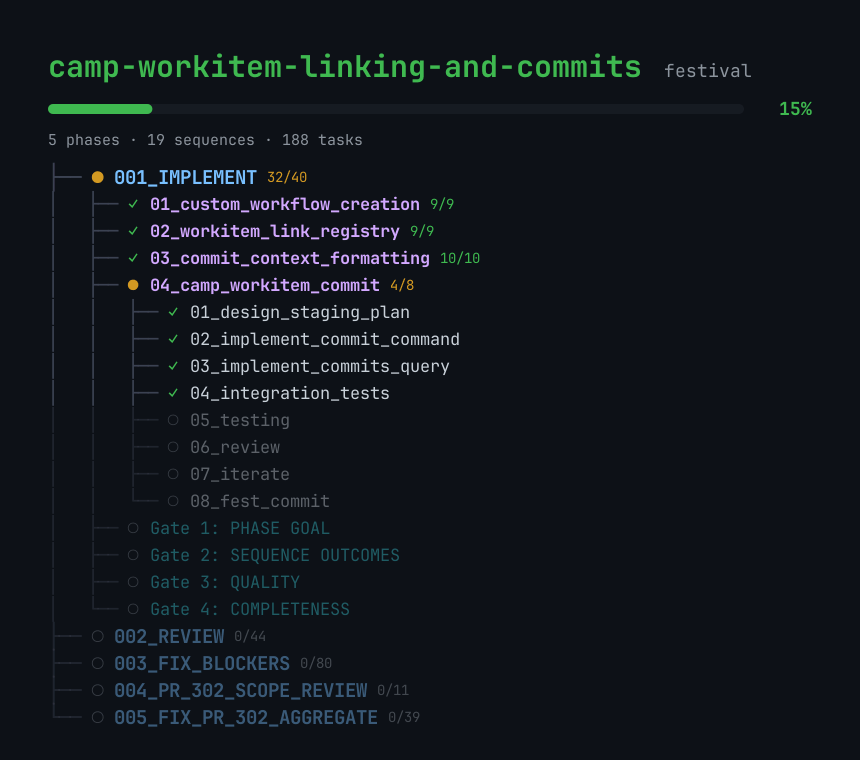
Watch the full build-plan replay (5 min 3 sec)

The task file gave the reviewer a specific check. The lookup had to return three commits for the same workitem, made in different repositories, in date order. You can inspect the change that shipped. The Camp pull request
I can use that feature on this article. Its research lives in workitem WI-973127. I can ask an agent, “Which commits came out of WI-973127?” One result is a documentation change in the Festival repository that drew on the same research. The commit carries the work ID in its subject. Months later, I can still get from that change back to what prompted it. The tagged documentation change
Try it on a feature you already owe someone
Install Festival using the steps for your platform, including starter camp and shell setup. Festival installation guide
- In your terminal, switch into the starter workspace with
camp switch festival. The shell shortcut iscsw festival. - Bring in your project. If you already have the code on your machine, run
camp project linkand choose its folder. If you have a Git URL, usecamp project add <git-url>to clone the repository into the workspace. - Launch your usual coding agent from that workspace and tell it which project you want to work on.
From here, you can work in chat. Say you owe someone a CSV export. You could start with this request.
Create a design workitem for exporting the filtered report to CSV. The downloaded file should have the same rows and columns I see on screen. Read the existing report code and show me the spec before you change it.
Read the spec as the person who asked for the feature. Can you tell which rows will land in the file? If the spec leaves that open, keep going in the same chat. You could say something like this.
A user can filter the report down to zero rows. Update the design workitem so the CSV still has its column headers in that case.
Once the spec describes what you want, you can ask the agent to build from it. If you want the export checked in stages, ask for a festival in the same chat.
Create a festival from this design workitem. Show me where you’ll compare the exported file with the filtered report.
Review the plan with the agent. When you’re ready, tell it, “I’m happy with the plan. Promote the festival to active and start the work.” The agent runs the execution loop and its checks. Festival quickstart
When the change is ready, try the export yourself. Then come back to the work item. You should be able to see what you asked for, what the agent checked and whether there’s still a decision waiting for you.
Calvin Grunewald’s account of his software factory prompted this look inside mine. A Look Inside the Factory